

Download Little Hopper’s Math Tac Toe – Free Educational Math Game for Kids
Overview
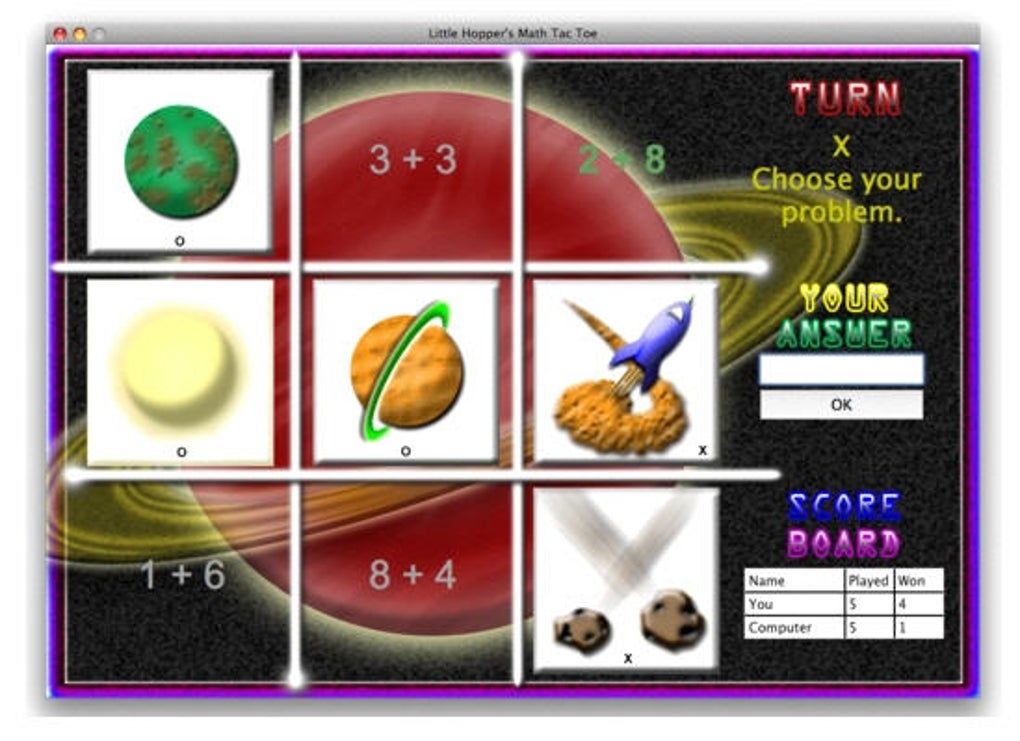
Little Hopper’s Math Tac Toe transforms the classic tic‑tac‑toe board into a playful math‑drill arena. Designed for children ages 5‑10, the app blends basic arithmetic—addition, subtraction, and multiplication—into a familiar grid game, encouraging kids to solve equations to claim an “X” or an “O”. Parents can switch between two skill levels and three operation modes, while also choosing to battle the built‑in AI or a fellow player on the same device.
A score‑keeping panel sits on the right side of the interface, letting families track progress over multiple rounds. Although the graphics are modest and occasional crashes have been reported, the core experience remains a light‑hearted way to reinforce fundamental math concepts without the pressure of formal worksheets. The app is free to download, runs on most modern operating systems, and receives periodic updates that address stability issues and add minor content tweaks.
Key Features & Gameplay Mechanics
- Three math modes: addition, subtraction, and multiplication.
- Two difficulty levels – Beginner (single‑digit numbers) and Intermediate (double‑digit numbers).
- Two play options: Solo vs. AI or Local two‑player mode.
- Dynamic score board that updates after every round.
- Parent mode that lets adults control the difficulty and monitor performance.
- Simple, child‑friendly UI with large buttons and audible feedback for correct/incorrect answers.
- Free download with optional in‑app purchases for extra skins (non‑essential).
- Regular security patches and bug‑fix updates via automatic download.
The gameplay loop is intentionally straightforward: a math problem appears in an empty cell, and the child must type the correct answer. A correct response places their chosen symbol (X or O) in the cell; an incorrect answer leaves the cell empty, prompting the next player to try. Winning requires three symbols in a row, just like traditional tic‑tac‑toe, but the added mental calculation layer encourages repeated practice. Because the game limits itself to basic operations, it’s ideal for reinforcing early‑grade concepts before moving on to division or fractions. The built‑in AI adapts its problem difficulty based on the selected skill level, ensuring a balanced challenge for both beginners and more confident learners.
Installation, Usage & Compatibility
Downloading Little Hopper’s Math Tac Toe is a breeze. Visit the official app store for your platform—Google Play for Android, Apple App Store for iOS, or the Microsoft Store for Windows. Click “Install,” allow the necessary permissions (storage for score logs and microphone for optional voice feedback), and the app will appear on your home screen within seconds. The installation package is under 25 MB, making it suitable even for devices with limited storage.
Once installed, launch the app and you’ll be greeted by a colorful splash screen featuring Little Hopper, the friendly mascot. The first-time user experience includes a short tutorial that walks you through selecting a game mode, choosing X or O, and entering answers via the on‑screen numeric keypad. Parents can access a hidden “Settings” menu by tapping the top‑right corner three times, where they can enable “Parent Mode,” set a time limit per move, or toggle sound effects.
The application is compatible with Android 8.0 and above, iOS 12.0+, Windows 10 (UWP version), and macOS 10.13+. It runs smoothly on tablets, smartphones, and even low‑end laptops, thanks to its lightweight engine. While the graphics are modest, they scale appropriately across screen sizes, and the UI automatically switches to landscape mode for a more spacious board view on larger devices. Regular updates, released roughly every six weeks, improve stability and add minor visual polish, helping to mitigate the occasional crash reported by early users.
Pros, Cons & Frequently Asked Questions
Pros
- Free and easy to download.
- Combines learning with a classic game format.
- Adjustable difficulty makes it suitable for a wide age range.
- Local two‑player mode encourages family interaction.
- Score tracking helps monitor progress over time.
Cons
- Graphics are outdated and may not appeal to tech‑savvy kids.
- No division or advanced math operations.
- Occasional crashes on older Android devices.
- Limited content can lead to quick mastery, reducing long‑term replay value.
Frequently Asked Questions
Is Little Hopper’s Math Tac Toe truly free?
Yes, the core game is completely free. Optional cosmetic skins can be purchased, but they do not affect gameplay.
Can the app be used offline?
Absolutely. All math problems are generated locally, so once installed you can play without an internet connection.
What age group benefits most from this game?
Children aged 5‑10 find the balance of fun and learning ideal, though younger kids can also enjoy the visual elements with parental guidance.
Does the game support multiplayer over the internet?
No, multiplayer is limited to local two‑player mode on the same device. Future updates may introduce online play.
How often are updates released?
The developer typically rolls out stability patches and minor feature additions every 4‑6 weeks.
Little Hopper’s Math Tac Toe offers a clever blend of gameplay and elementary math practice. While the visuals feel dated and occasional crashes can be frustrating, the app’s educational value, ease of use, and free price point make it a worthwhile addition to any child’s learning toolkit.
Conclusion & Call to Action
Little Hopper’s Math Tac Toe succeeds at turning arithmetic drills into an engaging, family‑friendly game. Its free availability, straightforward controls, and adjustable difficulty levels make it an excellent first step for parents who want to introduce math concepts without the pressure of worksheets. Although the graphics could use a refresh and the content depth is limited to basic operations, the app still delivers measurable educational benefits, especially for younger learners who thrive on interactive play. If you’re looking for a low‑cost, secure way to supplement your child’s math practice, download Little Hopper’s Math Tac Toe today and watch the numbers turn into fun!
Ready to start? Click here to download the free app now and begin the learning adventure.







